Pre-Beta
Case Study
Design System Compliance Plugin for Figma
Automating design system compliance in Figma
Audit frames for WCAG compliance, enforce brand tokens, reconcile typography hierarchy, and recommend semantic structure. Built with Cursor and the Figma Plugin API.
Senior Product Designer | Design Systems | AI-First Design | Cursor | Figma API
I recommend setting the playback speed to 2x (in YouTube, click the gear icon).
The Gap
Design system compliance breaks down at scale. Auditing contrast ratios, catching off-brand colors, and enforcing type hierarchy are repetitive, manual checks that most teams either skip under deadline pressure or catch too late in QA.
The tools that exist treat compliance as a report or are only focused on the warnings but don't propose solutions. I wanted to build one that closes the loop - it not only surfaces issues and suggests correct values in real time inside the canvas where decisions are actually made, but also allows teams to export token files and documentation as part of the flow.
How it Works
If designers did not have to rely on scanning of Figma files by eye to conduct QA, they could systematically correct compliance issues with an app designed to surface difficult-to-detect issues.
As the gap analysis showed, many plugins that exist today are capable of flagging issues, but none so far suggests semantic labels or generates token files or documentation in a complete workflow.
Figma designers need a system that:
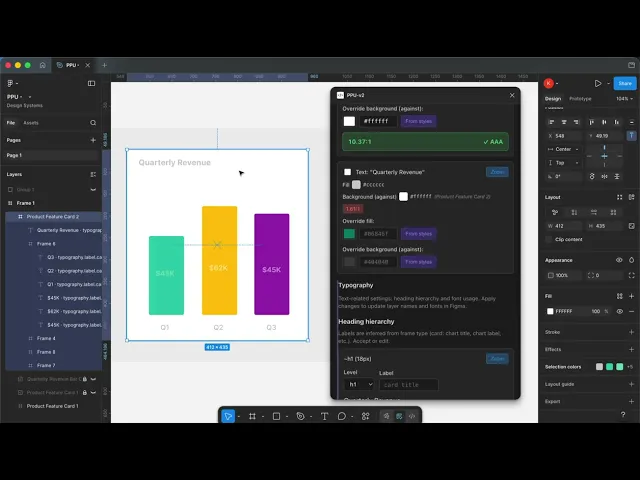
Detects Contrast & Color Compliance: the plugin analyzes selected frames against WCAG contrast requirements and brand color tokens, flagging violations and suggesting compliant alternatives.
Detects and Suggests Typography Hierarchy: the plugin evaluates type usage across frames, identifies inconsistencies in scale, weight, and role, and recommends corrections aligned to the design system's type hierarchy.
Proposes Semantic Component Labeling: the plugin also interprets frame structure to recommend meaningful labels: card title, card subtitle, section header, bridging visual design with accessible, developer-ready component architecture.
Provides Structured Output: the plugin generates and exports updated design tokens as JSON and markdown documentation, creating a direct handoff pipeline from design audit to engineering implementation.
My Approach
How I Built It
This project started at the Into Design Systems Hackathon, where I identified the gap between static compliance reporting and real-time design system enforcement, tackling a real-world problem.
I designed the full plugin UX: the audit flow, how corrections are surfaced, what gets exported, and built it end-to-end using Cursor for AI-assisted development and the Figma Plugin API. The entire workflow from problem identification to functional prototype happened within the hackathon, and I've continued developing independently since.
Cursor accelerated the build significantly, not as a code generator I blindly accepted, but as a prototyping partner that let me iterate on plugin logic, test edge cases, and refine interaction behavior at a pace that would have taken significantly longer working solo without AI assistance.
Design Decisions
Suggest, don't prescribe: the plugin recommends corrections, but it doesn't auto-apply them. Designers need to understand why something is flagged and make the call themselves, especially when brand expression and accessibility requirements are in tension. This mirrors a human-in-the-loop philosophy I apply across all my AI-integrated work.
Export what dev teams actually need: structured JSON tokens and markdown documentation are core outputs, not afterthoughts. The plugin closes the loop between identifying a design system inconsistency and giving engineering a usable artifact to act on, without requiring a separate handoff step.
Status
95% complete and approaching beta launch. The core analysis engine, correction suggestions, semantic labeling, and export pipeline are functional. Final work focuses on edge case handling and preparing for community release.